An allergen menu with the 14 EU allergens on every dish
Guests with an allergy need to know what they can eat, and EU rules say that information must be available. Keeping it right by hand on a paper card, a website and a QR menu is hard. In MenuKlaar you tick each dish's allergens once, and your QR menu, its filter and, with Pro, your print menu all show the same.
What the rule says
The EU regulation on food information, Regulation (EU) No 1169/2011, lists in Annex II fourteen substances and products that cause allergies or intolerances. When a dish contains one of them, your guests must be able to know.
This isn't only about packaged food. Under Article 44, the information is also mandatory for food that isn't prepacked, such as the dishes and drinks you serve in a restaurant, café or hotel.
How you give that information, on the menu, on paper or in person, the regulation leaves to each EU country. In the Netherlands the NVWA supervises it: the information may be written or oral, and the NVWA asks you to name the specific cereal containing gluten and the specific nut, such as wheat or hazelnut. In Belgium the FAVV (AFSCA) supervises it, under the Royal Decree of 17 July 2014: there too it may be written or oral, and if you give it orally, guests must be told in writing that they can ask.
Working in Flanders? There the menu is often called the spijskaart and the list per dish an allergenenfiche. MenuKlaar shows the allergens at every dish of your QR menu, wherever you are.
Read Regulation (EU) No 1169/2011 on EUR-Lex
Official sources
- NVWA: allergens in non-prepacked food (Dutch)
- NVWA: which allergens to name (Dutch)
- FAVV/AFSCA: allergen legislation
- Belgian Chamber: allergen information in horeca, 2022 (Dutch and French)
This page sums up what the regulation says. It isn't legal advice.
The 14 allergens
In the order of Annex II, by their usual short names, with the icons your guests see on your menu.
- 1Cereals containing gluten
- 2Crustaceans
- 3Eggs
- 4Fish
- 5Peanuts
- 6Soybeans
- 7Milk
- 8Nuts
- 9Celery
- 10Mustard
- 11Sesame
- 12Sulphur dioxide and sulphites
- 13Lupin
- 14Molluscs
Adding allergens
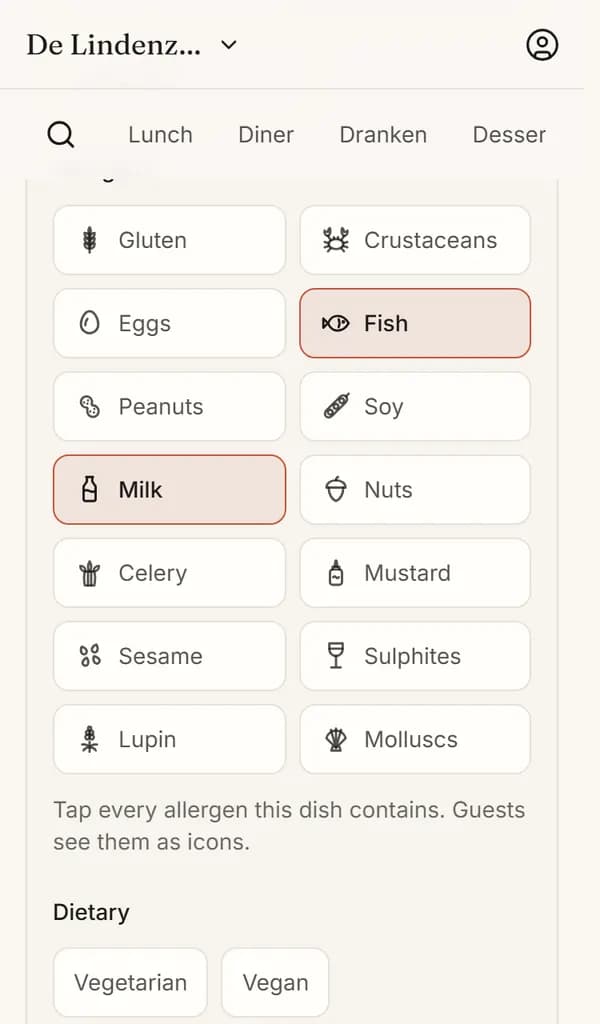
In the menu editor, every dish has the 14 allergens as buttons. Tap the ones it contains, that's all. Contains none? Tap “Contains none of the 14 allergens”, or the dish shows as not filled in. When you add your menu from a photo or PDF, MenuKlaar suggests allergens for each dish. They're marked as guesses, so you check them before guests see them.
For cereals containing gluten and for nuts you can also name the kind, as the NVWA asks: wheat, rye, barley or oats, and almonds, hazelnuts, walnuts or another of the eight nuts. Guests see it next to the allergen, like “Gluten (wheat)”, and the print menu puts it after the number.
MenuKlaar records what a dish contains. “May contain traces” isn't a separate option.
What your guests see
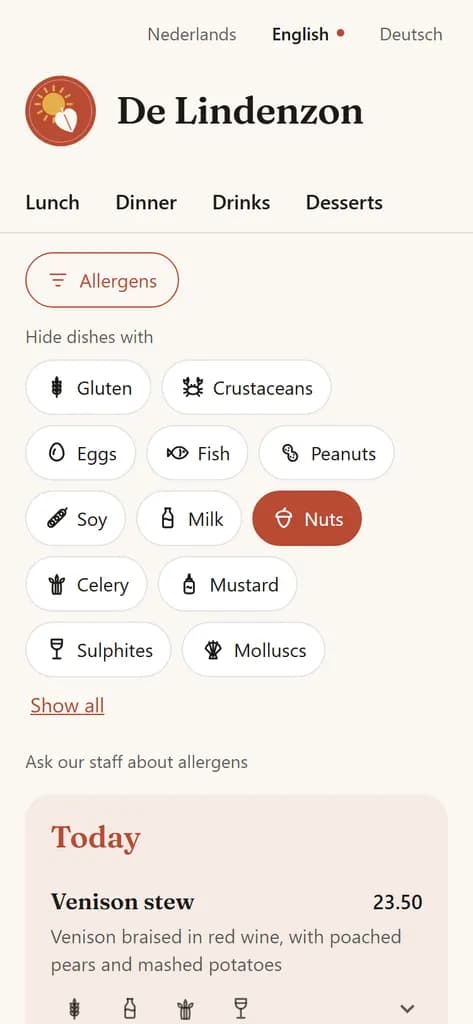
On your QR menu, the allergens show as small icons with each dish. When a guest taps the dish, every allergen is spelled out. Prefer names to icons? Pick “Names only” on the Design page, under Customise, Allergens and labels, and the names show right with the dish.
With the Allergens button at the top of your menu, guests pick what they can't eat, gluten or nuts for example. The filter offers all 14. The dishes with that allergen are hidden, and “Show all” brings them back. A dish whose allergens aren't filled in yet stays visible, with a note to ask your staff.
On paper: numbers and a legend
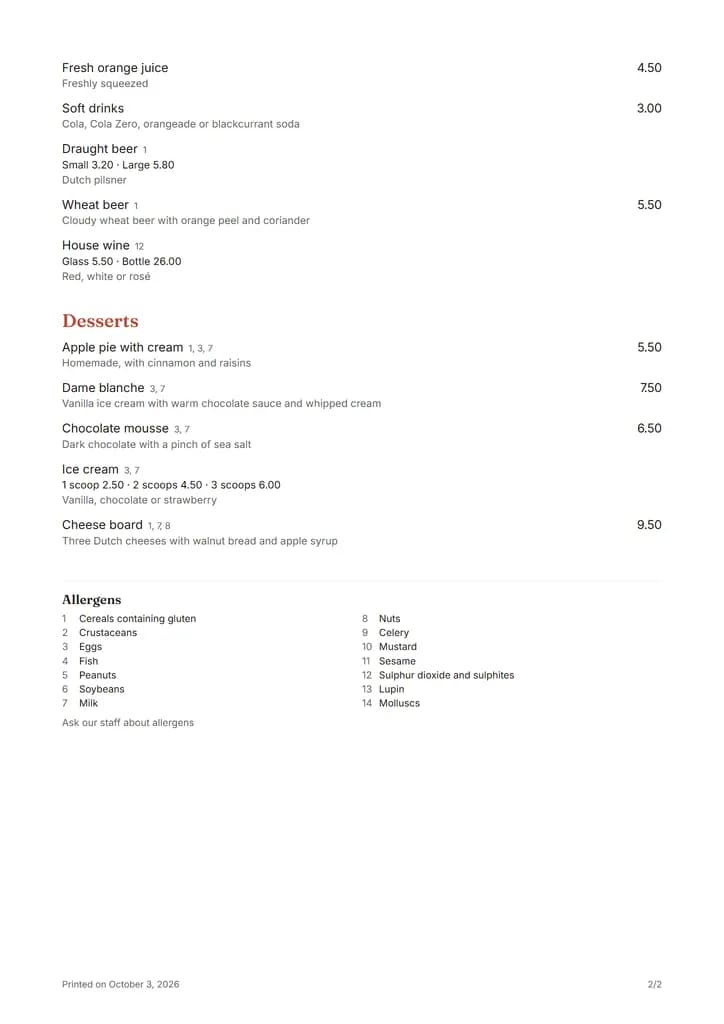
With Pro you download your menu as a print-ready PDF. Each dish has the numbers of its allergens after its name, from 1 to 14, with a legend of all 14 names at the bottom. The PDF is made from your latest menu every time, so the numbers stay right after a change.
With Pro, a TV screen in your venue shows the same numbers after each dish, with a legend of the allergens on that board.
The allergen line
At the bottom of your QR menu and under the legend of the print menu, the line “Ask our staff about allergens” shows by default. It tells guests they can ask. You can write your own text, up to 200 characters, and it's translated like your dishes. You can also turn it off.
Need an allergen chart to print today? Make one free, no account
Questions and answers
Which 14 allergens do I need to list?
These, in the order of Annex II of Regulation (EU) No 1169/2011 and by their usual short names: Cereals containing gluten, crustaceans, eggs, fish, peanuts, soybeans, milk, nuts, celery, mustard, sesame, sulphur dioxide and sulphites, lupin, and molluscs.
Do the allergens have to be on the menu itself?
The regulation says the information must be available, also for food that isn't prepacked. How, in writing or in person, each EU country decides (Article 44). The rules for your country are explained by its food safety authority (in the Netherlands, the NVWA).
Can a guest hide dishes with gluten?
Yes. With the allergen filter, a guest hides every dish with gluten, or with any other allergen. What's left doesn't contain that allergen, going by what you entered. Traces aren't covered: MenuKlaar only records what a dish contains.
Are the allergens MenuKlaar suggests correct?
MenuKlaar reads your dishes and makes a suggestion, but it doesn't know what happens in your kitchen. That's why those allergens are marked as guesses until you confirm them. You decide what's on your menu.
Does the allergen filter cost extra?
No. The 14 allergens, the icons, the filter and the allergen line are in every plan, Free included. The print menu with its legend is part of Pro.
Can I show my menu with its allergens in English?
Yes. With Pro, MenuKlaar translates your dishes into English and other languages automatically. In the English menu the allergens are there too, with the same icons and the same filter. On Free your menu is online in one language.