Your menu in your guests' languages
Tourists, expats and students order more easily from a menu they can read. MenuKlaar translates yours as you save it, keeps your own corrections, and guests pick their language on their phone.
When guests can't read the menu
A guest from abroad points at a dish and asks what it is. Someone on your staff translates, table by table, on the busiest evening of the week. Questions about allergens in another language take the longest, and they matter most.
A printed menu in a second language helps, until a price changes or a dish is added: then the English card is out of date first.
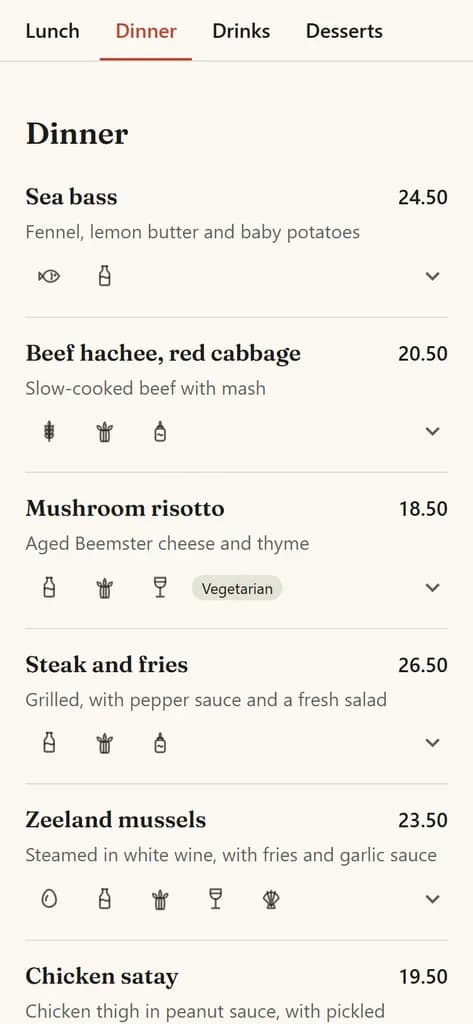
Translated as you save
With Pro, MenuKlaar translates your dishes, descriptions, categories and notes into the languages you pick: English, German, French, Spanish, Turkish, Chinese, up to 100 languages per venue. A new dish or a changed description is translated when you save it, so every language stays as current as your own.
- You write your menu once, in your own language.
- Prices, sold out today and daily specials are the same in every language, because they are one menu.
- Your allergen line and your closed-day notes are translated too.
Guests pick their language
The languages sit at the top of your QR menu. With many of them, one button opens the list with the languages of the guest's phone first. The choice is remembered on that phone, without a cookie, so the next scan opens in the same language.
The allergens keep their numbers and icons in every language, with their names in the guest's language.
Your corrections stay
Automatic translations are a good start, not the last word. You can change any translation in the menu editor. A translation you edited is never overwritten: when you later change the original, it is marked "source changed" so you can check it yourself.
Some dish names are better left alone, like "bitterballen" or "stamppot". Change them back and they stay that way.
What Free and Pro include
On Free your QR menu shows one language: your menu's main language. Pro adds as many languages as you like and the automatic translation. Every account starts with 14 days of Pro, so you can see your menu in other languages before you decide.
Translations go through DeepSeek, outside the EU. We send only menu text, never your guests' data or your account details.
Which languages to add
Start with English, then the languages of the guests you actually get: German near the border or on the coast, French for Belgian and French visitors. With Pro, Insights shows which languages guests' phones asked for that your menu does not have yet.
Questions and answers
How good are the automatic translations?
Good enough for most menus: a language model translates them with the dish, its category and the menu around it in mind. Check a few dishes in each language and change what you would say differently; your changes are kept.
Which languages can I add?
Almost any language, up to 100 per venue: English, German, French, Spanish, Italian, Turkish, Arabic, Chinese and many more. Add them in Settings, under Languages.
Is translating my menu free?
Translation is part of Pro, which costs €15 a month excluding VAT, and of the 14-day trial. On Free your menu shows in one language, which you write yourself.
Are the allergens translated too?
Yes. Each allergen keeps its number and icon in every language, and its name is shown in the guest's language. Your allergen line, such as "Ask our staff about allergens", is translated with your menu.
What is sent for translation?
Only the text of your menu, to DeepSeek, outside the EU. Never your guests' data or your account details. Our privacy policy has the details.